Create Dynamic Visuals with 10 Smoke Fire Flame Transparent PNG
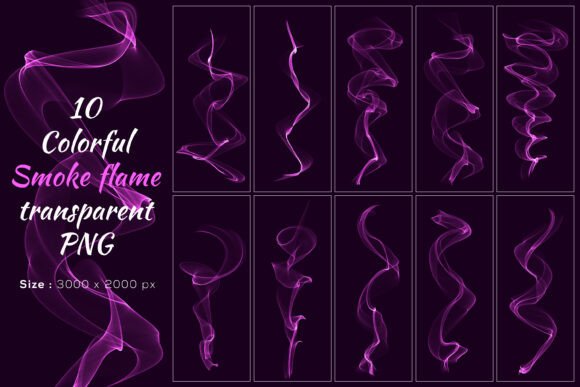
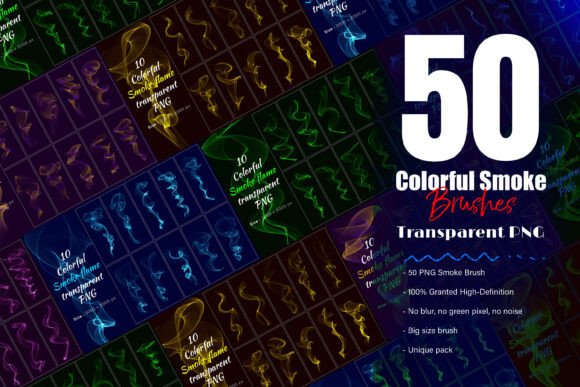
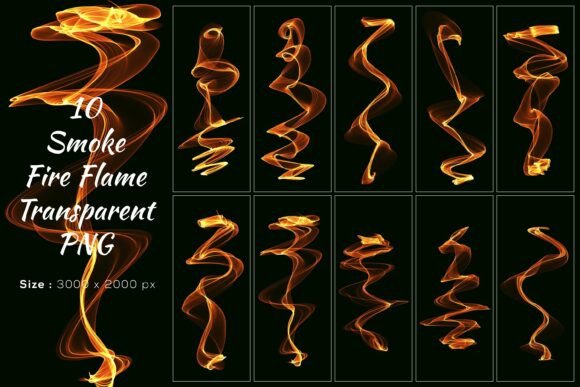
Whether you're designing a poster, editing a product photo, or creating digital art, the right visual elements can elevate your work from ordinary to extraordinary. The 10 Smoke Fire Flame Transparent PNG pack offers a versatile and high-quality solution for creators who want to add a touch of realism, drama, or motion to their projects. Each of the ten smoke shapes is hand-painted and professionally rendered, giving you the flexibility to use them individually or stack them together for more complex effects.
These smoke PNGs are especially valuable because they're created with precision and clarity. At 3000×2000 pixels, they’re large enough to use in high-resolution designs without any loss of quality. Unlike generic smoke brushes or blurry overlays, these images capture both artificial and natural smoke textures, making them suitable for a wide variety of design contexts. Whether you're going for a cinematic look or a subtle atmospheric effect, this pack gives you the tools to achieve it with ease.
Why Realistic Smoke PNGs Matter in Design
Smoke effects are more than just aesthetic—they can convey emotion, movement, and atmosphere. A well-placed smoke overlay can make a product photo feel more dramatic, give a logo a sense of motion, or enhance the mood of a digital illustration. The 10 Smoke Fire Flame Transparent PNG set stands out because it's made from real, hand-painted textures, not algorithm-generated simulations. This means the smoke looks authentic, with natural variations in density, shape, and flow.
Because each PNG is transparent, you can layer it over any background without worrying about awkward edges or mismatched tones. This makes the pack ideal for both digital and print design projects. Whether you're working on a website, a social media post, or a physical poster, these smoke images adapt seamlessly to your needs.
How Creators Use Smoke PNGs in Real Projects
Let’s look at how different users might apply these smoke effects in their work:
- Graphic designers use smoke overlays to create dramatic backgrounds for posters, album covers, or branding materials. The transparency and high resolution make it easy to blend with other elements without losing clarity.
- Photographers often layer smoke PNGs over portraits or product shots to add depth and texture. For example, a fashion shoot might use a subtle smoke effect to give a photo an ethereal, dreamlike quality.
- Video editors can import these PNGs into motion graphics software to simulate real smoke movement without expensive 3D rendering. This is especially useful for quick edits or smaller projects with tight deadlines.
- Digital artists use smoke PNGs to enhance fantasy illustrations, sci-fi scenes, or action sequences. The natural shapes help create believable explosions, magical effects, or atmospheric settings.
- Marketers and social media creators incorporate smoke effects into promotional graphics to make them stand out. A simple overlay can transform a basic image into something visually striking and engaging.
Practical Tips for Using Smoke Fire Flame PNGs
While the 10 Smoke Fire Flame Transparent PNG set is user-friendly, there are a few things to consider before diving in:
- Layering techniques: Try stacking two or three different smoke PNGs to create a more complex and dynamic effect. You can adjust opacity and blending modes to fine-tune how they interact with your background.
- Color matching: If your design uses a specific color palette, you can easily tint the smoke using adjustment layers in Photoshop or other editing software. This helps the smoke blend naturally with your project.
- Scale and resolution: Since each PNG is 3000×2000 pixels, you have plenty of room to zoom in or crop without losing detail. Just make sure your editing software can handle large files smoothly.
- Creative masking: Use smoke PNGs as masks to reveal or hide parts of your design. This can create a soft transition or add an element of mystery to your visuals.
- Commercial use: These PNGs are completely original and free from copyright concerns, so you can confidently use them in client work, commercial products, or marketing campaigns.
When to Use Smoke Effects in Your Work
Smoke isn’t just for action scenes or dark themes—its versatility makes it useful in many different contexts. Here are a few real-life scenarios where smoke PNGs come in handy:
- Wedding invitations: Add a soft, romantic smoke overlay behind floral elements or calligraphy text.
- Brand identity: Use smoke textures in logo reveals or animated intros to give your brand a sleek, modern edge.
- E-commerce product photography: Enhance product shots with subtle smoke to create a luxurious or mysterious vibe.
- Video game assets: Digital artists working on 2D games can use these PNGs for environmental effects like fog, smoke, or magical trails.
- Personal art projects: Whether you're creating a collage or a surreal photo composite, smoke PNGs help tie different visual elements together.
What Makes This Smoke PNG Pack Stand Out
Many smoke brushes and overlays on the market look artificial or overly repetitive. The 10 Smoke Fire Flame Transparent PNG set avoids these issues by offering:
- Unique, hand-painted textures that capture the organic flow of real smoke.
- High-definition clarity with no blur, noise, or pixelation—ideal for professional work.
- Versatile sizing that supports both digital and print formats without quality loss.
- Transparent backgrounds for seamless integration with any design or background.
- No copyright concerns, so you can use them confidently in any project, personal or commercial.
Final Thoughts
If you're looking for a reliable, high-quality smoke effect that adds depth and realism to your visuals, the 10 Smoke Fire Flame Transparent PNG pack is a smart investment. Whether you're a professional designer, a hobbyist, or someone who just wants to make their photos or graphics more engaging, this set gives you the tools to create stunning results without the hassle of complex rendering or licensing issues.
So if you’ve been searching for a way to bring more atmosphere and movement into your work, give this pack a try. You might be surprised at how much a simple smoke overlay can transform your design. And if you find it useful, don’t forget to rate it 5 stars ⭐⭐⭐⭐⭐ to help others discover this valuable creative resource.